API
1. Introduce
1.1 What is a C Mini Program
C Mini Program is a mini program written in C/C++ language. It is a small program that can be run in the ETStudio. Through the APIs provided by ETStudio, it conveniently implements various functions, such as timers, sending and receiving of CAN and LIN messages, reading and writing of digital signals, analog signals, power control, and system variables.
1.2 Document Introduction
This document describes the APIs provided by the C Mini Program.
2. Initialization Functions and Main Functions
2.1 A simple example
title="./sample.cpp"
#include "BaseMiniProgram.h"

void OnStart()
{
   CAN::Frame frame(0x1F1, 8, CAN::Channel_1::ChannelMappingID);
   for(int i = 0; i < 8; i++) frame.Data(i) = 1;
   frame.Transmit();
}

void OnExit()
{
}
2.2 Return Code Definitions
typedef enum
{
	ErrCode_Success = 0,
	ErrCode_NullArgument,
	ErrCode_NotImplemented,
	ErrCode_ChannelDisabled,
	ErrCode_DriverNotSupport = 254,
	ErrCode_DriverError = 255,
} KAPI_ErrCode;
2.3 C Mini Program Initialization Functions
OnStartThis function is called once after the C Mini Program starts. You can register periodic functions or timers here.
void OnStart()
{
}
OnExitThis function is called when the C Mini Program ends.
void OnExit()
{
}
3. Global variables
3.1 GetCurrentChannelMappingID
int GetCurrentChannelMappingID();- Description
- The channel mapping ID is used to identify the channel of the current node. The channel mapping ID is set in the ETStudio.
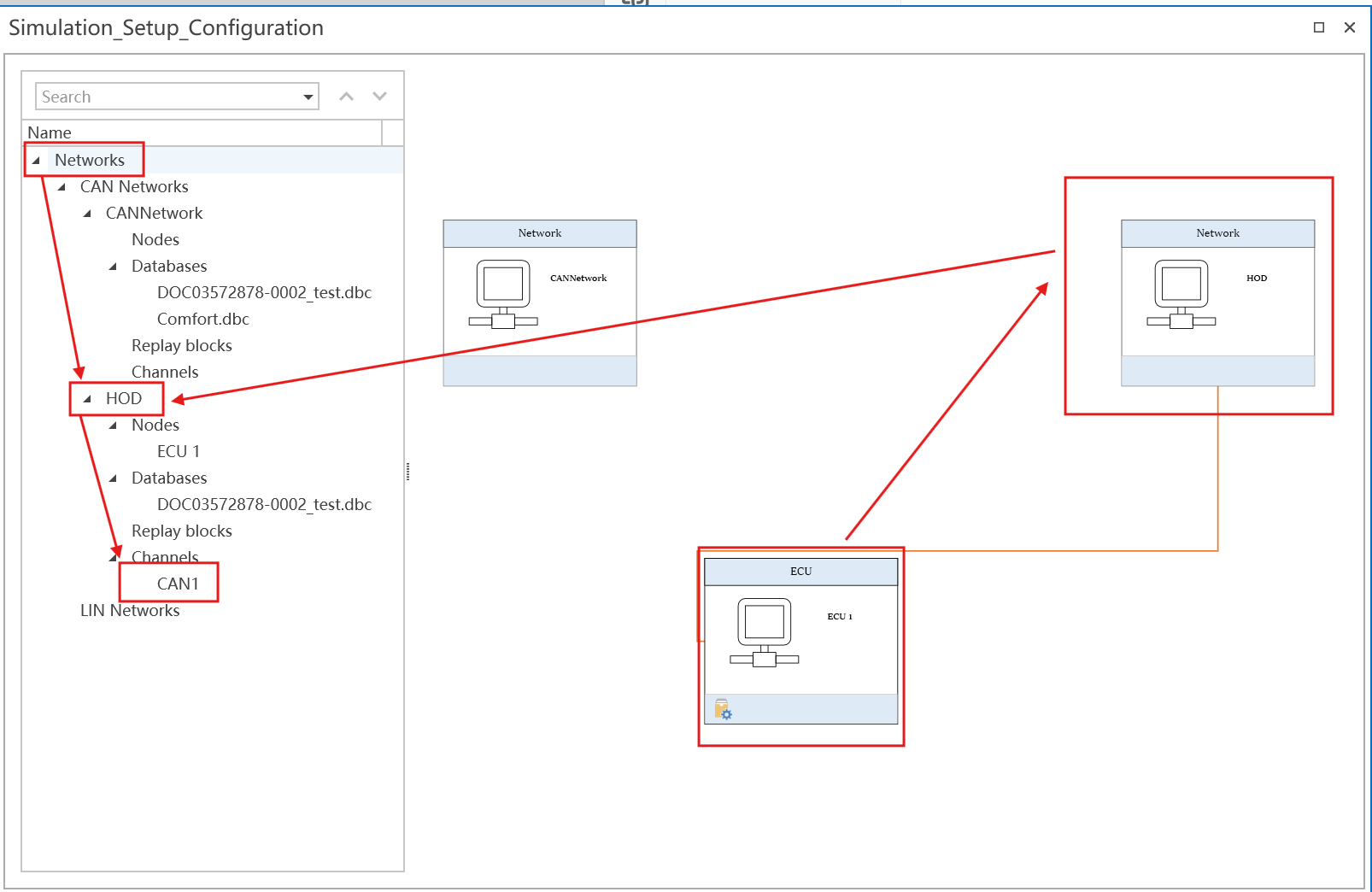
- The channel mapping ID is used to identify the channel of the current node. The channel mapping ID is set in the ETStudio.
4. Timer
4.1 start_timer
void* start_timer(uint64_t interval, boolean onceTimer, void (*onTimer)(void* pTimer));
Description
- start a timer
parameters
- interval Timer interval in milliseconds
- onceTimer
- TRUE Single-shot timer (auto-stops after timeout)
- FALSE Continuous timer (auto-restarts after timeout)
- onTimer Callback function when timer expires
Return
- void* Timer handle
usage
// create a 1 second timer
void onTimer(void* pTimer)
{
	// Do something
}
void OnStart()
{
 start_timer(1000, false, onTimer);
}
4.2 stop_timer
void stop_timer(void* pTimer);
Description
- stop a timer
parameters
- pTimer Timer handle returned by start_timer
usage
void onTimer(void* pTimer)
{
	// Do something
}
void OnStart()
{
 void* timer = start_timer(1000, false, onTimer);
 ...
 stop_timer(timer);
}
4.3 SetHighResolutionTimer
void SetHighResolutionTimer(boolean high);
Description
- Set a high-resolution timer
parameters
- high
- TRUE Start the high-resolution timer
- FALSE Turn off the high-resolution timer
usage
void onTimer(void* pTimer)
{
 	// Do something
}
void OnStart()
{
 SetHighResolutionTimer(TRUE);
 start_timer(1, true, OnTimer);
}
Note: This API is a global setting. After setting it, the CPU usage increases. Only one-time timers with a duration of less than 5ms (excluding) need to be set as high-precision timers.
5. System Variables
5.1 Access System Variables
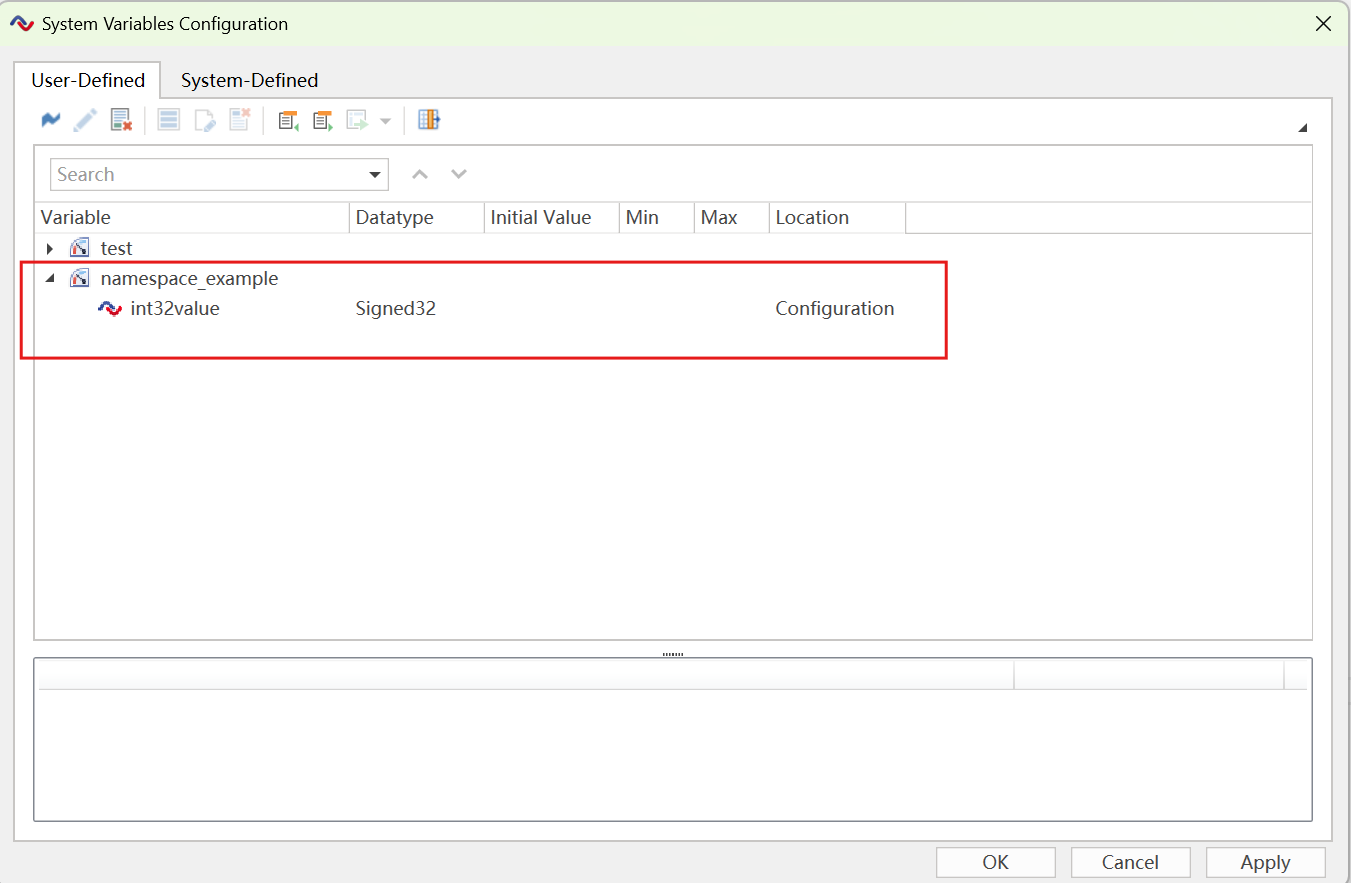
- Create System Variables in the ETStudio System Variables Interface
- Read System variable value
int32_t varValue = namespace_example::int32value; - Set the System variable value
namespace_example::int32value = 30;
5.2 Register System Variable OnChange
5.2.1 SetOnChange
void SetOnChange(void (*onChange)())
Description
- Register a callback function when the system variable changes
parameters
- onChange Callback function when system variable changes
Usage
void on_namespace_example_int32valueChange()
{
  int32_t val = namespace_example::int32value;
  char msg[64];
  sprintf(msg, "Value changed to: %d", val);
  show_console_message(msg);
}
void OnStart()
{
  namespace_example::int32value.SetOnChange(on_namespace_example_int32valueChange);
  namespace_example::int32value = 100;
}
5.2.2 OnValueChange
Usage
SysVar::SysVarInt32 Value("namespace", "name", true);
void MyValueChangeHandler(int32_t newValue)
{
  char msg[64];
  sprintf(msg, "Value changed to: %d", newValue);
  show_console_message(msg);
}

void OnStart()
{
  Value.OnValueChange = MyValueChangeHandler;
  Value = 100;
}
6. Send messages defined in DBC or LDF files via the interface
6.1 Send Frame
Transmit a specific CAN/CANFD frame
Description
- Send a CAN, CAN FD, or LIN frame based on the Simulation Node configuration.
Usage
- Assume we have imported a dbc/ldf file into the Simulation Network LIN/CANBus, which contains a message named Gateway_1. The following code can be used to send this CAN, CAN FD, or LIN message.
CANBus::Gateway_1 msg;
msg.Gear = 1;
msg.EngineRunning = 2;
msg.Ig_15 = 3;
msg.Ig_15R = 4;
msg.StarterKey = 5;
msg.Transmit();
- Messages can be sent to the specified Channel Mapping ID in the following two ways.
// first method
CANBus::Gateway_1 msg(2);
msg.Gear = 1;
msg.EngineRunning = 2;
msg.Ig_15 = 3;
msg.Ig_15R = 4;
msg.StarterKey = 5;
msg.Transmit();
// second method
CANBus2::Gateway_1 msg;
msg.Gear = 1;
msg.EngineRunning = 2;
msg.Ig_15 = 3;
msg.Ig_15R = 4;
msg.StarterKey = 5;
msg.Transmit();
Note: For the second method, you need to add the relevant bus in the Virtual_Node_Setup_Configuration.
- Send a message to the specified BusType (
BUS_TYPE_CAN)
CANBus::Gateway_1 msg;
msg.Gear = 1;
msg.EngineRunning = 2;
msg.Ig_15 = 3;
msg.Ig_15R = 4;
msg.StarterKey = 5;
msg.BusType = BUS_TYPE_CAN;
msg.Transmit();
- CANBus is the name of the Simulation Network
- Gateway_1 is the name of the frame.
- BusType
BUS_TYPE_CAN,BUS_TYPE_CANFD,BUS_TYPE_LIN
Transmit a specific LIN header frame
Description
- Send a LIN header frame based on the Simulation Node configuration.
Usage
- Assume we have imported a ldf file into the Simulation Network LINBus, which contains a message named LIN_Test_message. The following code can be used to send a LIN header.
LINBus::LIN_Test_message msg;
msg.TransmitHeader();
- LINBus is the name of the Simulation Network
- LIN_Test_message is the name of the LIN frame.
6.2 Send Frame with Signal Value Set by Panel
static int StaticTransmit(int channelMappingID = 0);
Description
- Send a CAN, CAN FD, or LIN frame based on the Simulation Node configuration.
- The difference from Send Frame is that the signals in the message are configured via Panel.
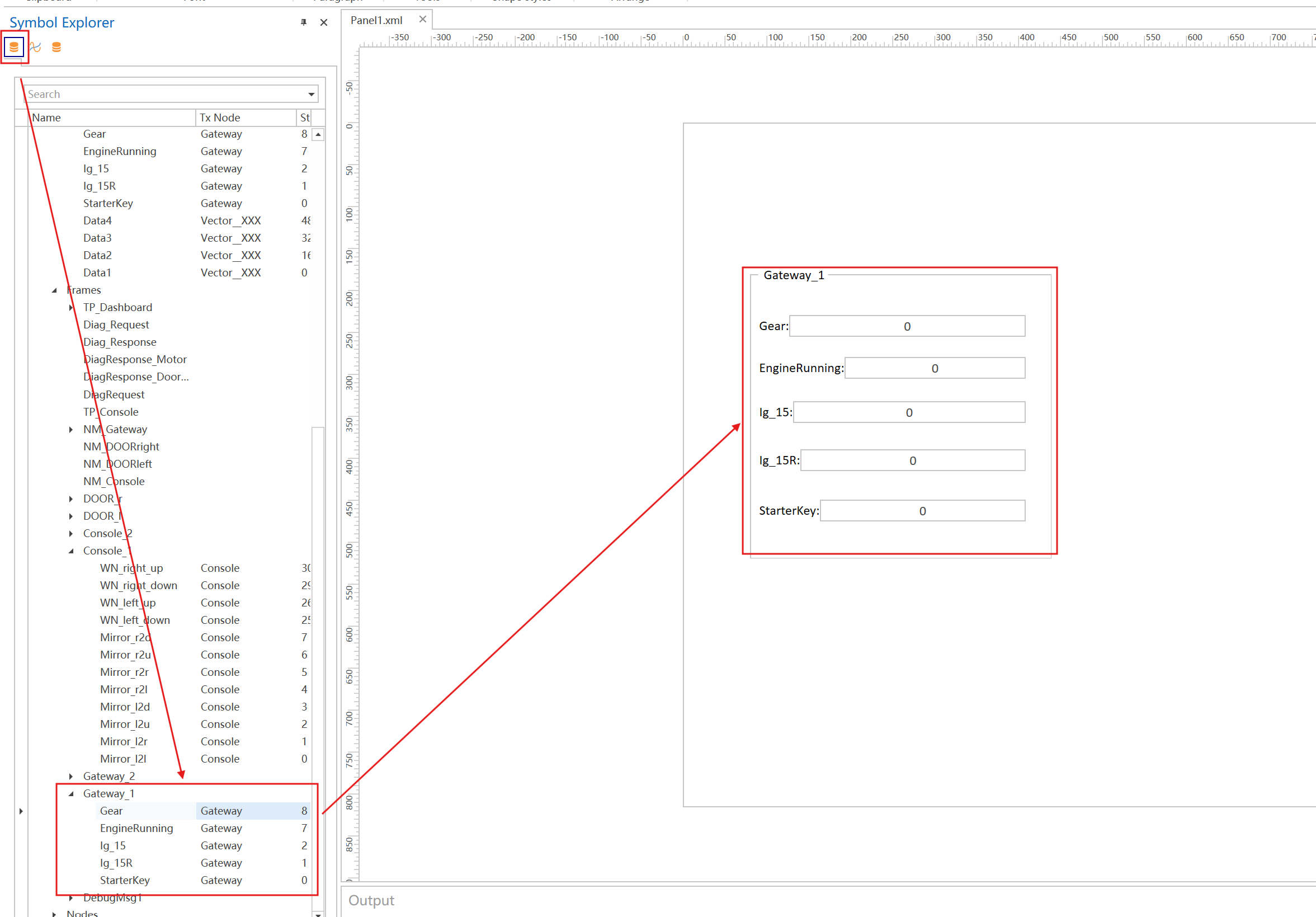
parameters
- channelMappingID CAN channel ID, 0 means the default channel ID of the current node
- busType
BUS_TYPE_CAN,BUS_TYPE_CANFDorBUS_TYPE_LIN
Usage
CANBus::Gateway_1::StaticTransmit();
- CANBus is the name of the Simulation Network
- Gateway_1 is the name of the frame.
6.3 receive frame
void on_recv_message(<NetworkName>::<FrameName> *msg)
Description
- Register a callback function when the CAN, CANFD or LIN frame is received.
parameters
- msg Pointer to the received frame, the type of the pointer is determined by the dbc/ldf file imported into the Simulation Network.
Usage
void on_recv_message(CANBus::Gateway_1 *msg)
{
    // Do something
}
void OnStart()
{
  CANBus::Gateway_1::OnMessage = on_recv_message;
  CANBus::Gateway_1::OnTxMessage = on_recv_message;
  CANBus::Gateway_1::OnPreTxMessage  = on_recv_message;
  CANBus::Gateway_1::OnUrgentMessage = on_recv_message;
}
- CANBus is the name of the Simulation Network
- Gateway_1 is the name of the frame.
Note: The above callback can only receive frames from the CAN1 channel. To receive frames from the CAN2 channel, you need to follow the format below.
CANBus2::Gateway_1::OnMessage = on_recv_message;
CANBus2::Gateway_1::OnTxMessage = on_recv_message;
CANBus2::Gateway_1::OnPreTxMessage = on_recv_message;
CANBus2::Gateway_1::OnUrgentMessage = on_recv_message;
7. Frame
7.1 Register a message
7.1.1 Register a CAN/LIN message
Frame(uint32_t frameID, uint32_t frameDataLen, uint32_t channelMappingID);
Description
- define a CAN/LIN message
parameters
- frameID Message ID
- frameDatalen Message length
- channelMappingID channel ID, 0 means the default channel ID of the current node
Usage
CAN::Frame frame(0x1F1, 8, CAN::Channel_1::ChannelMappingID);

LIN::Frame frame(0x3C, 8,LIN::Channel_1::ChannelMappingID);
- If you need to register a message for all channels, refer to the following example.
Usage
CAN::Frame frame(0x1F1, 0, 0xFFFFFFFFL);
7.1.2 Register a UDP message
Frame(uint32_t frameDataLen, uint32_t channelMappingID, UDPNodeInfo nodeInfo);
Description
- define a UDP message
parameters
- frameDatalen Message length
- channelMappingID channel ID, 0 means the default channel ID of the current node
- nodeInfo UDP node network information
Usage
Ethernet::UDPNodeInfo nodeInfo;
nodeInfo.setSrcMac( 1, 2, 3, 4, 5, 6 )
        .setSrcIp( 127, 0, 0, 1 )
        .setSrcPort(11)
        .setDstMac( 1, 2, 3, 4, 5, 6 )
        .setDstIp( 192, 168, 0, 1 )
        .setDstPort(29)
        .setTtl(64)
        .setVlan(129);
Ethernet::Frame frame(8, Ethernet::Channel_1::ChannelMappingID, nodeInfo);
7.2 Modify the registered signal data
Description
- After defining a signal, you can modify the signal data in the following two ways.
Usage
// Method 1
CAN::Frame frame(0x1F1, 8, CAN::Channel_1::ChannelMappingID);
for (int i = 0; i < 8; i++) frame.Data(i) = 1;//Modify the value of the byte

// Method 2
CAN::Frame frame(0x1F1, 8, CAN::Channel_1::ChannelMappingID);
uint8_t* dataBuf = frame.Data();//Get the start pointer
for (int i = 0; i < 8; i++) dataBuf[i] = 1;
7.3 Send the signal
- If only the frame header needs to be sent, refer to the following code.
Usage
LIN::Frame frame(0x3C, 8, LIN::Channel_1::ChannelMappingID);
for (int i = 0; i < 8; i++) frame.Data(i) = 1;
frame.TransmitHeader();
- If you need to send the complete signal, refer to the following code.
Usage
CAN::Frame frame(0x1F1, 8, CAN::Channel_1::ChannelMappingID);
for (int i = 0; i < 8; i++) frame.Data(i) = 1;
frame.Transmit();
7.4 Get timestamp
- If you need to get the timestamp, refer to the following code.
Usage
void CAN_OnMessage(CAN::Frame* msg)
{
  char buf[255];
  uint64_t current_time = msg->GetFrameTimestamp();
  sprintf(buf, "Receive Callback:timestamp=%d", current_time);
  show_console_message(buf);
}
void OnStart()
{
 CAN::OnMessage = CAN_OnMessage;
}
7.5 Variable information in the Frame
parameters
-
_channelMappingID Logical channel mapping ID of the frame
Usage
void CAN_OnMessage(CAN::Frame* msg)
{
 char buf[255];
 sprintf(buf, "Receive Callback:channelMappingID=%d", msg->_channelMappingID);
 show_console_message(buf);
}
void OnStart()
{
CAN::OnMessage = CAN_OnMessage;
} -
_frameID CAN frame ID (including standard/extended ID)
Usage
void CAN_OnMessage(CAN::Frame* msg)
{
 char buf[255];
 sprintf(buf, "Receive Callback:frameID=0x%X", msg->_frameID);
 show_console_message(buf);
}
void OnStart()
{
CAN::OnMessage = CAN_OnMessage;
} -
BusType Type of the bus where the frame is transmitted
If you want to send a generic CAN message on a CAN FD channel, refer to the following code.
Usage
void OnSend(HANDLER timer)
{
    CAN::Frame frame(0x1F1, 8, CAN::Channel_1::ChannelMappingID);
    for (int i = 0; i < 8; i++) frame.Data(i) = 1;
    frame.BusType = BUS_TYPE_CAN;
    frame.Transmit();
}
void OnStart()
{
    start_timer(1000, false, OnSend);
} -
Channel Physical hardware channel number
Usage
void CAN_OnMessage(CAN::Frame* msg)
{
 char buf[255];
 sprintf(buf, "Receive Callback:Channel=%d", msg->Channel);
 show_console_message(buf);
}
void OnStart()
{
CAN::OnMessage = CAN_OnMessage;
} -
Dir Frame direction (receive = 0, transmit = 1)
Usage
void CAN_OnTxMessage(CAN::Frame* msg)
{
  char buf[255];
  sprintf(buf, "Transmit Complete Callback:Dir =%s", msg->Dir == 1 ? "Tx" : "Rx");
  show_console_message(buf);
}
void OnStart()
{
CAN::OnTxMessage = CAN_OnTxMessage;
} -
ExtendedFrame Frame ID format flag (0 = Standard Frame with 11-bit ID, 1 = Extended Frame with 29-bit ID)
Usage
void CAN_OnMessage(CAN::Frame* msg)
{
  char buf[255];
  sprintf(buf, "Receive Callback:ExtendedFrame =%d", msg->ExtendedFrame);
  show_console_message(buf);
}
void OnStart()
{
 CAN::OnMessage = CAN_OnMessage;
} -
Dlc Data length code of the frame (CAN: 0-8, CAN FD: 0-15)
Usage
void CAN_OnMessage(CAN::Frame* msg)
{
  char buf[255];
  sprintf(buf, "Receive Callback:Dlc =%d", msg->Dlc);
  show_console_message(buf);
}
void OnStart()
{
 CAN::OnMessage = CAN_OnMessage;
} -
DataLength Actual valid data length of the frame
Usage
void CAN_OnMessage(CAN::Frame* msg)
{
  char buf[255];
  sprintf(buf, "Receive Callback:DataLength =%d", msg->DataLength);
  show_console_message(buf);
}
void OnStart()
{
 CAN::OnMessage = CAN_OnMessage;
} -
Encode Encoded signal value
Usage
//Assuming the imported DBC contains a signal named Gateway_1.
uint8_t Data[64];
CANBus::Gateway_1 msg;
for(i=2;i<64;i++)
{
    msg.Encode();
    Data[i-2] = msg.Data(i);
}
Note: The Transmit function includes the encode functionality.
-
BrsFlag When BRS = 1, the data segment of the CAN FD frame will switch to a higher bit rate than the arbitration segment; when BRS = 0, the entire frame uses the same rate.
Usage
void OnTimer(HANDLER timer)
{
   CAN::Frame frame(0x18DA28F4, 8, CAN::Channel_1::ChannelMappingID);
   for (int i = 0; i < 8; i++) frame.Data(i) = 1;
   frame.ExtendedFrame = 1;
   frame.BrsFlag = 1;
   frame.Transmit();
}

void OnStart()
{
   start_timer(100, false, OnTimer);
} -
EsiFlag Error status indicator bit (0 indicates normal, 1 indicates passive error)
-
Reserved Reserved field (fill with fixed value 0, reserved for protocol compatibility and future function expansion)
-
RtrFrame Remote frame flag (0 = Data Frame, 1 = Remote Transmission Request Frame)
8. CAN / CANFD
Type definitions
typedef struct
{
	uint32_t timestamp_us;
	uint8_t bus_type;
	uint8_t event_type;
	uint8_t channel;
	uint8_t dir;
	uint8_t dlc;
	uint8_t extended_frame;
	uint8_t subDeviceNumber;
	uint8_t reserved;
	uint32_t id;
	uint8_t data[64];
} EM_ReceiveFrame_t;

typedef struct
{
	uint32_t can_id;
	bool rtr_frame;
	bool extended_frame;
	uint8_t can_dlc;
	uint8_t channel;
	uint8_t data[64];
	uint32_t timestamp_us;
} EM_CANSendFrame_t;
8.1 Send CAN Frame
Description
- Send a CAN frame
8.1.1 CAN_Tx
Note: This legacy API is not recommended for further use. We recommend using the format of 8.1.2.
KAPI_ErrCode CAN_Tx(uint32_t channelMappingID, uint32_t id, uint8_t dlc, uint8_t* data);
parameters
- channelMappingID CAN channel ID, 0 means the default channel ID of the current node
- id CAN ID
- dlc Data Length Code
- data Pointer to data buffer
Return
- 0 Success
- Other Failed
Usage
uint8_t data[8] = {0x01, 0x02, 0x03, 0x04, 0x05, 0x06, 0x07, 0x08};
CAN_Tx(0, 0x123, 8, data);
8.1.2 CAN::Frame frame
Usage
CAN::Frame frame(0x1F1, 8, CAN::Channel_1::ChannelMappingID);
for (int i = 0; i < 8; i++) frame.Data(i) = 1;
frame.Transmit();
CAN::Frame frame(0x1F1, 8, CAN::Channel_1::ChannelMappingID);
uint8_t* dataBuf = frame.Data();
for (int i = 0; i < 8; i++) dataBuf[i] = 1;
frame.Transmit();
Note: If you want to send a CAN FD frame, you can go to Device -> Channel Settings to set Mode to CAN FD and modify frameDatalen to the corresponding value.
Usage
CAN::Frame frame(0x1F1, 12, CAN::Channel_1::ChannelMappingID);
for (int i = 0; i < 12; i++) frame.Data(i) = 1;
frame.Transmit();
8.2 Register CAN Receive Callback
Description
- Register a callback function when a CAN frame is received
8.2.1 register_CANRxEvent
Note: This legacy API is not recommended for further use. We recommend using the format of 8.2.2.
KAPI_ErrCode register_CANRxEvent(uint32_t channelMappingID, uint32_t id, ReceiveFrameHandler callback);
parameters
- channelMappingID CAN channel ID, 0 means the default channel ID of the current node
- id CAN ID to filter
- callback Receive frame handler (typedef void (ReceiveFrameHandler)(EM_ReceiveFrame_t const))
Return
- 0 Success
- Other Failed
Usage
void onCANRx(EM_ReceiveFrame_t const* frame)
{
	// Do something
}

uint32_t channelMappingID = 0;
uint32_t id = 0x123;
register_CANRxEvent(channelMappingID, id, onCANRx);
8.2.2 CAN::OnMessage
Usage
void CAN_OnMessage(CAN::Frame* msg)
{
	// Do something
}
CAN::OnMessage = CAN_OnMessage;//All frames on all CAN channels will trigger the CAN_OnMessage callback function

CAN::Channel_1::OnMessage = CAN_OnMessage;//All frames on CAN Channel 1 will trigger the CAN_OnMessage callback function

CAN::Frame frame(0x101, 0, CAN::Channel_1::ChannelMappingID);
frame.OnMessage = CAN_OnMessage;//The 0x101 frame on CAN Channel 1 will trigger the CAN_OnMessage callback function

CAN::Frame frame(0x101, 0, 0xFFFFFFFFL);
frame.OnMessage = CAN_OnMessage;//The 0x101 frame on all CAN channels will trigger the CAN_OnMessage callback function
Note: The format of the CAN FD receive callback is the same as that of CAN.
8.3 Register CAN Transmission Complete Callback
Description
- Register a callback function when a CAN frame is transmitted
8.3.1 register_CANTxEvent
Note: This legacy API is not recommended for further use. We recommend using the format of 8.3.2.
KAPI_ErrCode register_CANTxEvent(uint32_t channelMappingID, uint32_t id, CANSendFrameHandler callback);
parameters
- channelMappingID CAN channel ID, 0 means the default channel ID of the current node
- id CAN ID to filter
- callback Transmission complete handler (typedef void (CANSendFrameHandler)(EM_CANSendFrame_t))
Return
- 0 Success
- Other Failed
Usage
void onCANTx(EM_CANSendFrame_t* frame)
{
	// Do something
}
uint32_t channelMappingID = 0;
uint32_t id = 0x123;
register_CANTxEvent(channelMappingID, id, onCANTx);
8.3.2 CAN::OnTxMessage
Usage
void CAN_OnTxMessage(CAN::Frame* msg)
{
	// Do something
}
CAN::OnTxMessage = CAN_OnTxMessage;//All frames on all CAN channels will trigger the CAN_OnTxMessage callback function

CAN::Channel_1::OnTxMessage = CAN_OnTxMessage;//All frames on CAN Channel 1 will trigger the CAN_OnTxMessage callback function

CAN::Frame frame(0x101, 0, CAN::Channel_1::ChannelMappingID);
frame.OnTxMessage = CAN_OnTxMessage;//The 0x101 frame on CAN Channel 1 will trigger the CAN_OnTxMessage callback function

CAN::Frame frame(0x101, 0, 0xFFFFFFFFL);
frame.OnTxMessage = CAN_OnTxMessage;//The 0x101 frame on all CAN channels will trigger the CAN_OnTxMessage callback function
Note: The format of the CAN FD transmission completion callback is the same as that of CAN.
8.4 Register CAN Pre-Transmission Callback
Description
- Register a callback function when a CAN frame is about to be transmitted
8.4.1 register_CANPreTxEvent
Note: This legacy API is not recommended for further use. We recommend using the format of 8.4.2.
KAPI_ErrCode register_CANPreTxEvent(uint32_t channelMappingID, uint32_t id, CANSendFrameHandler callback);
parameters
- channelMappingID CAN channel ID, 0 means the default channel ID of the current node
- id CAN ID to filter
- callback Pre-transmission handler (typedef void (CANSendFrameHandler)(EM_CANSendFrame_t))
Return
- 0 Success
- Other Failed
Usage
void onCANPreTx(EM_CANSendFrame_t* frame)
{
	// Do something
}
uint32_t channelMappingID = 0;
uint32_t id = 0x123;
register_CANPreTxEvent(channelMappingID, id, onCANPreTx);
8.4.2 CAN::OnPreTxMessage
Usage
void CAN_OnPreTxMessage(CAN::Frame* msg)
{
  	// Do something
}
CAN::OnPreTxMessage = CAN_OnPreTxMessage;//All frames on all CAN channels will trigger the CAN_OnPreTxMessage callback function

CAN::Channel_1::OnPreTxMessage = CAN_OnPreTxMessage;//All frames on CAN Channel 1 will trigger the CAN_OnPreTxMessage callback function

CAN::Frame frame(0x101, 0, CAN::Channel_1::ChannelMappingID);
frame.OnPreTxMessage = CAN_OnPreTxMessage;//The 0x101 frame on CAN Channel 1 will trigger the CAN_OnPreTxMessage callback function

CAN::Frame frame(0x101, 0, 0xFFFFFFFFL);
frame.OnPreTxMessage = CAN_OnPreTxMessage;//The 0x101 frame on all CAN channels will trigger the CAN_OnPreTxMessage callback function
Note: The format of the CAN FD pre-transmission callback is the same as that of CAN.
8.5 Register CAN Urgent Transmission Callback
Description
- Register a callback function when a high-priority urgent CAN frame needs to be processed(prior to normal CAN frame transmission/reception)
8.5.1 register_CANRxUrgentEvent
Note: This legacy API is not recommended for further use. We recommend using the format of 8.5.2.
KAPI_ErrCode register_CANRxUrgentEvent(uint32_t channelMappingID, uint32_t id, CANSendFrameHandler callback);
parameters
- channelMappingID CAN channel ID, 0 means the default channel ID of the current node
- id CAN ID to filter
- callback Urgent frame handler (typedef void (CANSendFrameHandler)(EM_CANSendFrame_t))
Return
- 0 Success
- Other Failed
Usage
void onCANUrgent(EM_CANSendFrame_t* frame)
{
	// Do something
}
uint32_t channelMappingID = 0;
uint32_t id = 0x123;
register_CANRxUrgentEvent(channelMappingID, id, onCANUrgent);
8.5.2 CAN::OnUrgentMessage
Usage
void CAN_OnUrgentMessage(CAN::Frame* msg)
{
  	// Do something
}
CAN::OnUrgentMessage = CAN_OnUrgentMessage;//All frames on all CAN channels will trigger the CAN_OnUrgentMessage callback function

CAN::Channel_1::OnUrgentMessage = CAN_OnUrgentMessage;//All frames on CAN Channel 1 will trigger the CAN_OnUrgentMessage callback function

CAN::Frame frame(0x101, 0, CAN::Channel_1::ChannelMappingID);
frame.OnUrgentMessage = CAN_OnUrgentMessage;//The 0x101 frame on CAN Channel 1 will trigger the CAN_OnUrgentMessage callback function

CAN::Frame frame(0x101, 0, 0xFFFFFFFFL);
frame.OnUrgentMessage = CAN_OnUrgentMessage;//The 0x101 frame on all CAN channels will trigger the CAN_OnUrgentMessage callback function
Note: The format of the CAN FD urgent callback is the same as that of CAN. OnUrgentMessage can be triggered by both Rx(receive) and Tx(transmit) messages. There is no priority relationship whatsoever between OnMessage and OnUrgentMessage. That is, if both callbacks are registered, there will be no scenario where the high-priority callback is invoked while the low-priority one is not executed.
8.6 Register CAN Error Transmission Callback
Description
- Register a callback function that will be triggered when a CAN frame transmission error occurs(such as bus off), enabling real-time monitoring and handling of CAN bus transmission error events.
Usage
void CAN_OnErrorMessage(CAN::Frame* msg)
{
  	// Do something
}
CAN::OnErrorMessage = CAN_OnErrorMessage;//All frames on all CAN channels will trigger the CAN_OnErrorMessage callback function

CAN::Channel_1::OnErrorMessage = CAN_OnErrorMessage;//All frames on CAN Channel 1 will trigger the CAN_OnErrorMessage callback function

CAN::Frame frame(0x101, 0, CAN::Channel_1::ChannelMappingID);
frame.OnErrorMessage = CAN_OnErrorMessage;//The 0x101 frame on CAN Channel 1 will trigger the CAN_OnErrorMessage callback function

CAN::Frame frame(0x101, 0, 0xFFFFFFFFL);
frame.OnErrorMessage = CAN_OnErrorMessage;//The 0x101 frame on all CAN channels will trigger the CAN_OnErrorMessage callback function
Note: The format of the CAN FD error frame callback is the same as that of CAN.
8.7 CAN Message Reception Priority
Description
- For the same CAN message, if multiple callbacks are registered for it, the high-priority callback will be invoked while the low-priority ones will not be executed.
Usage
// highest priority
CANBus::Gateway_1::OnTxMessage  = CAN_OnTxMessage;

// second-highest priority
CAN::Frame frame(0x101, 0, CAN::Channel_1::ChannelMappingID); frame.OnTxMessage = CAN_OnTxMessage;

// third-highest priority
CAN::Channel_1::OnTxMessage = CAN_OnTxMessage;

// lowest priority
CAN::Frame frame(0x101, 0, 0xFFFFFFFFL); frame.OnTxMessage = CAN_OnTxMessage;
9. LIN
Type definition
typedef struct
{
	uint8_t lin_head;
	uint8_t lin_dlc;
	uint8_t channel;
	uint8_t data[8];
	uint32_t timestamp_us;
} EM_LINSendFrame_t;
9.1 LIN Master Send Header
Note: This legacy API is not recommended for further use. We recommend using the format of 9.2.2
KAPI_ErrCode LinMaster_TxHeader(uint32_t channelMappingID, uint8_t header);
Description
- Send a LIN header
parameters
- channelMappingID LIN channel ID, 0 means the default channel ID of the current node
- header LIN header
Return
- 0 Success
- Other Failed
Usage
LinMaster_TxHeader(0, 0x3C);
9.2 LIN Master Send Header and Data
Description
- Send a LIN frame
9.2.1 LinMaster_Tx
Note: This legacy API is not recommended for further use. We recommend using the format of 9.2.2.
KAPI_ErrCode LinMaster_Tx(uint32_t channelMappingID, uint8_t header, uint8_t dlc, uint8_t* data);
parameters
- channelMappingID LIN channel ID, 0 means the default channel ID of the current node
- header LIN header
- dlc Data Length Code
- data Pointer to data buffer
Return
- 0 Success
- Other Failed
Usage
uint8_t data[8] = {0x01, 0x02, 0x03, 0x04, 0x05, 0x06, 0x07, 0x08};
LinMaster_Tx(0, 0x3C, 8, data);
9.2.2 LIN::Frame frame
Usage
LIN::Frame frame(0x3C, 8, LIN::Channel_1::ChannelMappingID);
for (int i = 0; i < 8; i++) frame.Data(i) = 1;
frame.Transmit();//Transmit Header and Data

frame.TransmitHeader();//Transmit Header
9.3 Register LIN Master Receive Callback
Description
- Register a callback function when a LIN frame is received
9.3.1 register_LinMasterRxEvent
Note: This legacy API is not recommended for further use. We recommend using the format of 9.3.2.
KAPI_ErrCode register_LinMasterRxEvent(uint32_t channelMappingID, uint8_t header, ReceiveFrameHandler callback);
parameters
- channelMappingID LIN channel ID, 0 means the default channel ID of the current node
- header LIN header to filter
- callback Receive frame handler (typedef void (ReceiveFrameHandler)(EM_ReceiveFrame_t const))
Return
- 0 Success
- Other Failed
Usage
void onLinMasterRx(EM_ReceiveFrame_t const* frame)
{
	// Do something
}

uint32_t channelMappingID = 0;
uint8_t header = 0x3C;
register_LinMasterRxEvent(channelMappingID, header, onLinMasterRx);
9.3.2 lIN::OnMessage
Usage
void LIN_OnMessage(LIN::Frame* msg)
{
	// Do something
}
lIN::OnMessage = LIN_OnMessage;//All frames on all LIN channels will trigger the LIN_OnMessage callback function

LIN::Channel_1::OnMessage = LIN_OnMessage;//All frames on LIN Channel 1 will trigger the LIN_OnMessage callback function

LIN::Frame frame(0x3C, 0, LIN::Channel_1::ChannelMappingID);
frame.OnMessage = LIN_OnMessage;//The 0x3C frame on LIN Channel 1 will trigger the LIN_OnMessage callback function

LIN::Frame frame(0x3C, 0, 0xFFFFFFFFL);
frame.OnMessage = LIN_OnMessage;//The 0x3C frame on all LIN channels will trigger the LIN_OnMessage callback function
9.4 Register LIN Master Transmission Callback
Description
- Register a callback function when a LIN frame is transmitted
9.4.1 register_LinMasterTxEvent
Note: This legacy API is not recommended for further use. We recommend using the format of 9.4.2.
KAPI_ErrCode register_LinMasterTxEvent(uint32_t channelMappingID, uint8_t header, LINSendFrameHandler callback);
parameters
-
channelMappingID LIN channel ID, 0 means the default channel ID of the current node
-
header LIN header to filter
-
callback Transmission complete handler (typedef void (LINSendFrameHandler)(EM_LINSendFrame_t))
Return
- 0 Success
- Other Failed
Usage
void onLinMasterTx(EM_LINSendFrame_t* frame)
{
	// Do something
}

uint32_t channelMappingID = 0;
uint8_t header = 0x3C;
register_LinMasterTxEvent(channelMappingID, header, onLinMasterTx);
9.4.2 LIN::OnTxMessage
Usage
void LIN_OnTxMessage(LIN::Frame* msg)
{
	// Do something
}
lIN::OnTxMessage = LIN_OnTxMessage;//All frames on all LIN channels will trigger the LIN_OnTxMessage callback function

LIN::Channel_1::OnTxMessage = LIN_OnTxMessage;//All frames on LIN Channel 1 will trigger the LIN_OnTxMessage callback function

LIN::Frame frame(0x3C, 0, LIN::Channel_1::ChannelMappingID);
frame.OnTxMessage = LIN_OnTxMessage;//The 0x3C frame on LIN Channel 1 will trigger the LIN_OnTxMessage callback function

LIN::Frame frame(0x3C, 0, 0xFFFFFFFFL);
frame.OnTxMessage = LIN_OnTxMessage;//The 0x3C frame on all LIN channels will trigger the LIN_OnTxMessage callback function
9.5 Register LIN Master Pre-Transmission Callback
Description
- Register a callback function when a LIN frame is about to be transmitted
9.5.1 register_LinMasterPreTxEvent
Note: This legacy API is not recommended for further use. We recommend using the format of 9.5.2.
KAPI_ErrCode register_LinMasterPreTxEvent(uint32_t channelMappingID, uint8_t header, LINSendFrameHandler callback);
parameters
- channelMappingID LIN channel ID, 0 means the default channel ID of the current node
- header LIN header to filter
- callback Pre-transmission handler (typedef void (LINSendFrameHandler)(EM_LINSendFrame_t))
Return
- 0 Success
- Other Failed
Usage
void onLinMasterPreTx(EM_LINSendFrame_t* frame)
{
	// Do something
}

uint32_t channelMappingID = 0;
uint8_t header = 0x3C;
register_LinMasterPreTxEvent(channelMappingID, header, onLinMasterPreTx);
9.5.2 lIN::OnPreTxMessage
Usage
void LIN_OnPreTxMessage(LIN::Frame* msg)
{
	// Do something
}
LIN::OnPreTxMessage = LIN_OnPreTxMessage;//All frames on all LIN channels will trigger the LIN_OnPreTxMessage callback function

LIN::Channel_1::OnPreTxMessage = LIN_OnPreTxMessage;//All frames on LIN Channel 1 will trigger the LIN_OnPreTxMessage callback function

LIN::Frame frame(0x3C, 0, LIN::Channel_1::ChannelMappingID);
frame.OnPreTxMessage = LIN_OnPreTxMessage;//The 0x3C frame on LIN Channel 1 will trigger the LIN_OnPreTxMessage callback function

LIN::Frame frame(0x3C, 0, 0xFFFFFFFFL);
frame.OnPreTxMessage = LIN_OnPreTxMessage;//The 0x3C frame on all LIN channels will trigger the LIN_OnPreTxMessage callback function
9.6 Register LIN Urgent Transmission Callback
Description
- Register a callback function when a high-priority urgent LIN frame needs to be processed(prior to normal LIN frame transmission/reception)
Usage
  void LIN_OnUrgentMessage(LIN::Frame* msg)
  {
  	// Do something
  }
  LIN::OnUrgentMessage = LIN_OnUrgentMessage;//All frames on all LIN channels will trigger the LIN_OnUrgentMessage callback function

  LIN::Channel_1::OnUrgentMessage = LIN_OnUrgentMessage;//All frames on LIN Channel 1 will trigger the LIN_OnUrgentMessage callback function

  LIN::Frame frame(0x3C, 0, LIN::Channel_1::ChannelMappingID);
  frame.OnUrgentMessage = LIN_OnUrgentMessage;//The 0x3C frame on LIN Channel 1 will trigger the LIN_OnUrgentMessage callback function

  LIN::Frame frame(0x3C, 0, 0xFFFFFFFFL);
  frame.OnUrgentMessage = LIN_OnUrgentMessage;//The 0x3C frame on all LIN channels will trigger the LIN_OnUrgentMessage callback function
9.7 Register LIN Error Transmission Callback
Description
- Register a callback function that will be triggered when a LIN frame transmission error occurs(such as LIN bus off), enabling real-time monitoring and handling of LIN bus transmission error events.
Usage
  void LIN_OnErrorMessage(LIN::Frame* msg)
  {
  	// Do something
  }
  LIN::OnErrorMessage = LIN_OnErrorMessage;//All frames on all LIN channels will trigger the LIN_OnErrorMessage callback function

  LIN::Channel_1::OnErrorMessage = LIN_OnErrorMessage;//All frames on LIN Channel 1 will trigger the LIN_OnErrorMessage callback function

  LIN::Frame frame(0x3C, 0, LIN::Channel_1::ChannelMappingID);
  frame.OnErrorMessage = LIN_OnErrorMessage;//The 0x3C frame on LIN Channel 1 will trigger the LIN_OnErrorMessage callback function

  LIN::Frame frame(0x3C, 0, 0xFFFFFFFFL);
  frame.OnErrorMessage = LIN_OnErrorMessage;//The 0x3C frame on all LIN channels will trigger the LIN_OnErrorMessage callback function
9.8 DisableIG
Usage
- Disable the sending of LIN messages in IG within the C mini-program.
Usage
LIN::Channel_1::DisableIG = 1;//Prohibit the transmission of LIN messages on Channel 1 in IG

LIN::Channel_1::DisableIG = 0;//Allow the LIN message transmission on Channel 1 in IG
10. DDS
10.1 Send Frame
10.1.1 Send UDP Frame
Description
- Send a UDP frame
Usage
Ethernet::UDPNodeInfo nodeInfo;
nodeInfo.setSrcMac( 1, 2, 3, 4, 5, 6 )
        .setSrcIp( 127, 0, 0, 1 )
        .setSrcPort(11)
        .setDstMac( 1, 2, 3, 4, 5, 6 )
        .setDstIp( 192, 168, 0, 1 )
        .setDstPort(29)
        .setTtl(64)
        .setVlan(129);//Configure UDP node information

Ethernet::Frame frame(8, Ethernet::Channel_1::ChannelMappingID, nodeInfo);
frame.Data(0) = 1;
frame.Data(1) = 2;
frame.Data(2) = 3;
frame.Data(3) = 4;
frame.Data(4) = 5;
frame.Data(5) = 6;
frame.Data(6) = 7;
frame.Data(7) = 8;

frame.Transmit();
10.1.2 Send the specific DDS Frame
Description
- Send a specific DDS frame
Usage
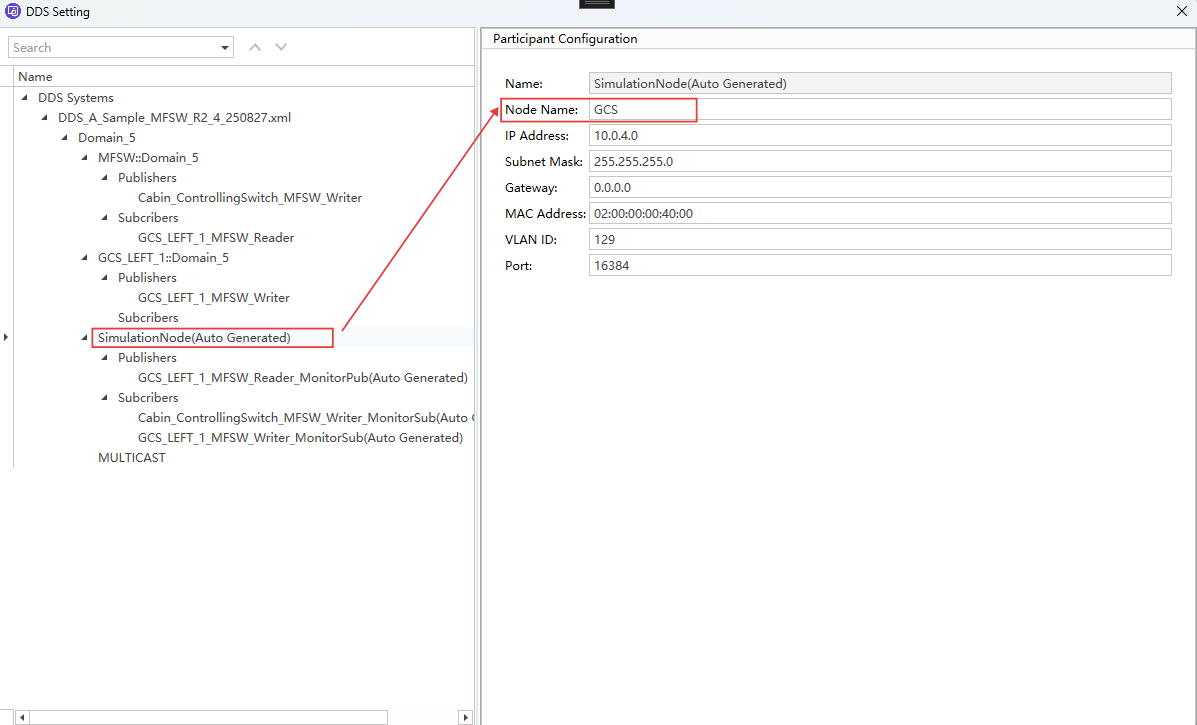
- Assume we have imported a xml file into the DDS System, we can designate Domain Name as Domain_5.
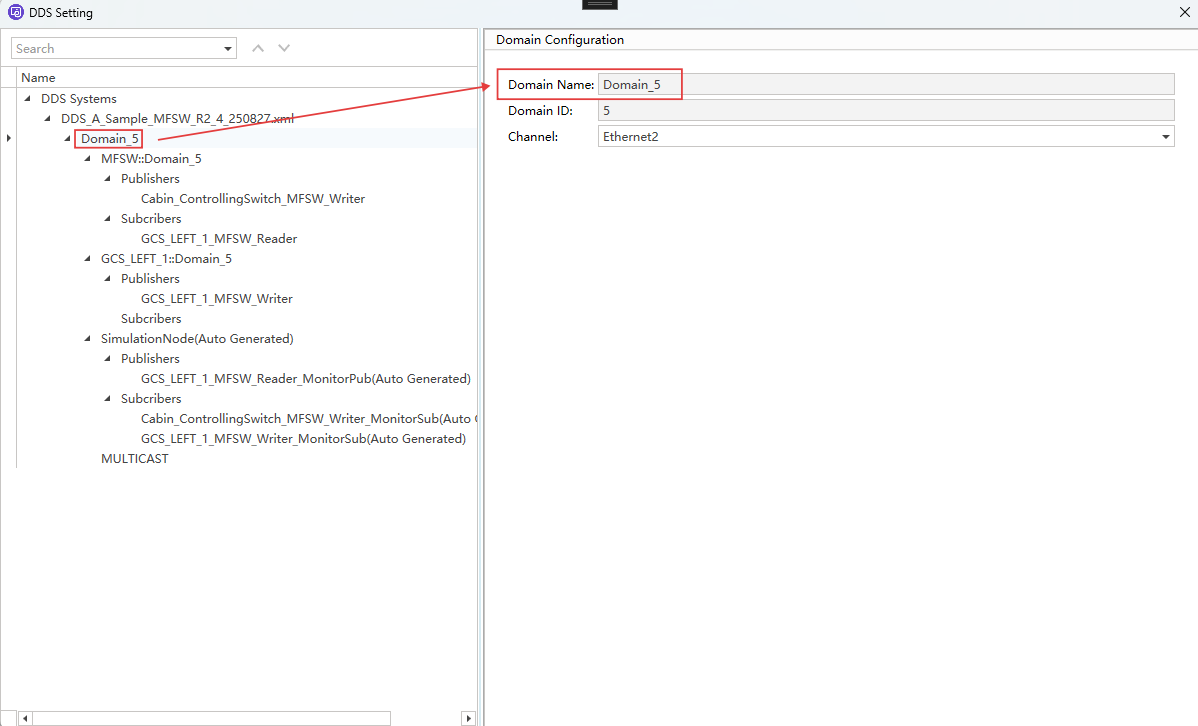
- A single domain may contain multiple nodes, now we designate a node as GCS.
- Topics enabled under Publishers can transmit signals.
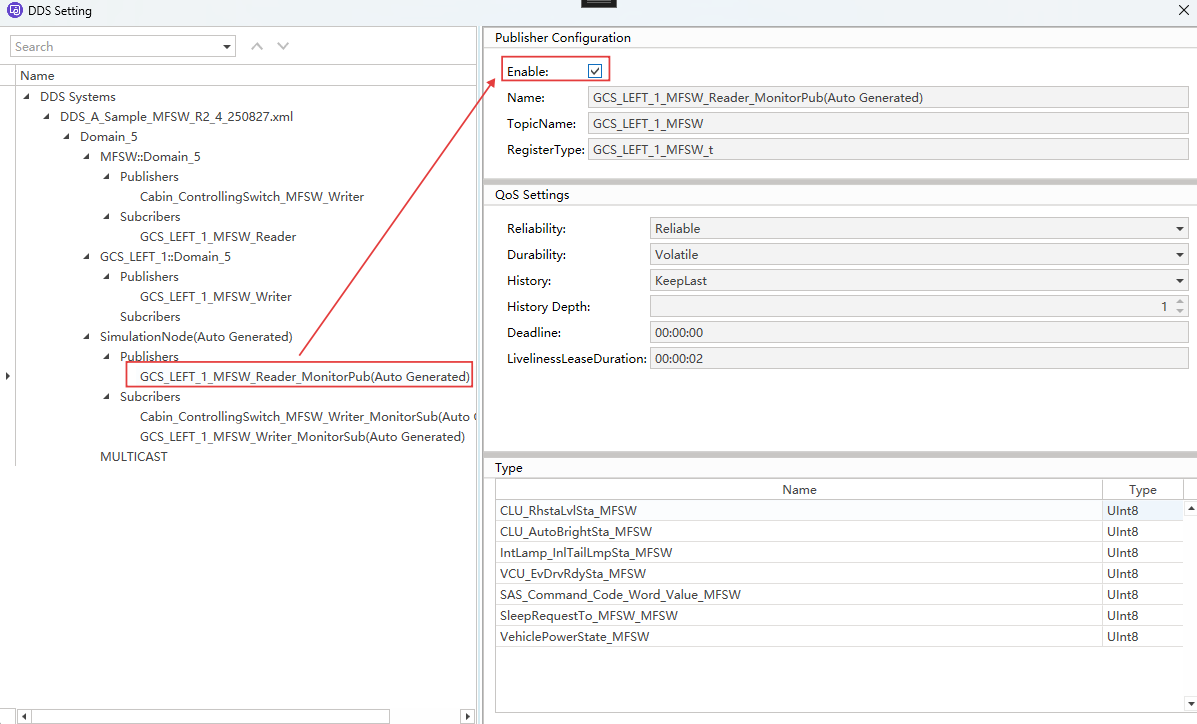
DDS::Domain_5::GCS::GCS_LEFT_1_MFSW msg;
msg.CLU_RhstaLvlSta_MFSW = 0xab;
msg.Transmit();
10.2 Register a callback for all Ethernet channels
- Ethernet callbacks can receive DDS/UDP/RTPS messages. If the callback is triggered, operations can be performed on the callback in the following format.
Usage
void OnEthFrameMessage(Ethernet::Frame* msg)
{
   if (msg->EventType == Ethernet::DDS_Data)
    {
      //Do something for DDS data
    }
   if (msg->EventType == Ethernet::UDP_Data)
    {
      //Do something for UDP data
    }
   if (msg->EventType == Ethernet::RTPS_Data)
    {
      //Do something for RTPS data
    }
}
10.2.1 Register receive callback for all Ethernet channels
Description
- All receive callbacks for all DDS/UDP/RTPS frames across all channels will trigger the OnMessage.
Usage
Ethernet::OnMessage = OnEthFrameMessage;
10.2.2 Register transmission completion callback for all Ethernet channels
Description
- All transmission completion callbacks for all DDS/UDP/RTPS frames across all channels will trigger the OnTxMessage.
Usage
Ethernet::OnTxMessage = OnEthFrameMessage;
10.2.3 Register urgent callback for all Ethernet channels
Description
- All urgent callbacks for all DDS/UDP/RTPS frames across all channels will trigger the OnUrgentMessage.
Usage
Ethernet::OnUrgentMessage = OnEthFrameMessage;
10.2.4 Register error frame callback for all Ethernet channels
Description
- If an error frame occurs in the DDS/UDP/RTPS messages across all channels, the error frame callback OnErrorMessage will be triggered.
Usage
Ethernet::OnErrorMessage = OnEthFrameMessage;
10.2.5 Register pre-transmission callback for all Ethernet channels
Description
- All pre-transmission callbacks for all DDS/UDP/RTPS frames across all channels will trigger the OnPreTxMessage.
Usage
Ethernet::OnPreTxMessage = OnEthFrameMessage;
10.3 Register a callback for a specific Ethernet channel
Note: The format of OnEthCh1FrameMessage is identical to that of OnEthFrameMessage in 10.2.
10.3.1 Register receive callback for Ethernet channel1
Description
- All receive callbacks for all DDS/UDP/RTPS frames on Channel1 will trigger OnMessage.
Usage
Ethernet::Channel_1::OnMessage = OnEthCh1FrameMessage;
10.3.2 Register transmission completion callback for Ethernet channel1
Description
- All transmission completion callbacks for all DDS/UDP/RTPS frames on Channel1 will trigger OnTxMessage.
Usage
Ethernet::Channel_1::OnTxMessage = OnEthCh1FrameTxMessage;
10.3.3 Register urgent callback for Ethernet channel1
Description
- All urgent callbacks for all DDS/UDP/RTPS frames on Channel1 will trigger OnUrgentMessage.
Usage
Ethernet::Channel_1::OnUrgentMessage = OnEthCh1FrameUrgentMessage;
10.3.4 Register error frame callback for Ethernet channel1
Description
- If an error frame occurs in the DDS/UDP/RTPS messages on Channel1, the error frame callback OnErrorMessage will be triggered.
Usage
Ethernet::Channel_1::OnErrorMessage = OnEthCh1FrameUrgentMessage;
10.3.5 Register pre-transmission callback for Ethernet channel1
Description
- All pre-transmission callbacks for all DDS/UDP/RTPS frames on Channel1 will triggerOnPreTxMessage.
Usage
Ethernet::Channel_1::OnPreTxMessage = OnEthCh1FrameUrgentMessage;
10.4 Receive the specific DDS message
Note: Callbacks registered in the following format can only receive messages sent in format 10.1.2
- If the specific DDS message is required to trigger the receive callback, the following code can be used.
Usage
  void OnDDSFrame(DDS::Domain_5::GCS::GCS_LEFT_1_MFSW *msg)
  {
   //DO something
  }

  DDS::Domain_5::GCS::GCS_LEFT_1_MFSW::OnMessage = OnDDSFrame;
- If the specific DDS message is required to trigger the pre-transmission callback, the following code can be used.
Usage
  void OnDDSPreTxFrame(DDS::Domain_5::GCS::GCS_LEFT_1_MFSW *msg)
  {
   //DO something
  }

  DDS::Domain_5::GCS::GCS_LEFT_1_MFSW::OnPreTxMessage = OnDDSPreTxFrame;
- If the specific DDS message is required to trigger the transmission completion callback, the following code can be used.
Usage
  void OnDDSTxFrame(DDS::Domain_5::GCS::GCS_LEFT_1_MFSW *msg)
  {
   //DO something
  }

  DDS::Domain_5::GCS::GCS_LEFT_1_MFSW::OnTxMessage = OnDDSTxFrame;
- If the specific DDS message is required to trigger the urgent callback, the following code can be used.
Usage
  void OnDDSUrgentFrame(DDS::Domain_5::GCS::GCS_LEFT_1_MFSW *msg)
  {
   //DO something
  }

  DDS::Domain_5::GCS::GCS_LEFT_1_MFSW::OnUrgentMessage = OnDDSUrgentFrame;
11. Digital
11.1 Set Digital Output Level
Description
- Set digital output level
11.1.1 Do_Set
Note: This legacy API is not recommended for further use. We recommend using the format of 11.1.2.
KAPI_ErrCode Do_Set(uint32_t channelMappingID, boolean lvl);
parameters
- channelMappingID Digital output channel ID
- lvl
- 0 Low level
- 1 High level
Return
- 0 Success
- Other Failed
Usage
Do_Set(0, 1);
11.1.2 Digital::Output::ChannelMappingID::Value
Usage
Digital::Output::Channel_1::Value = 1;
11.2 Get Digital Input Status
Description
- Get digital input status
11.2.1 Di_Get
Note: This legacy API is not recommended for further use. We recommend using the format of 11.2.2.
KAPI_ErrCode Di_Get(uint32_t channelMappingID, boolean* value);
parameters
- channelMappingID Digital input channel ID
- value Pointer to store input status
- 0 Low level
- 1 High level
Return
- 0 Success
- Other Failed
Usage
boolean value;
Di_Get(0, &value);
11.2.2 Digital::Input::ChannelMappingID::Value
Usage
  boolean DiInValue;
  DiInValue = Digital::Input::Channel_1::Value;
12. Analog
12.1 Get Analog Input Voltage
Description
- Get analog input voltage
12.1.1 Ai_Get
Note: This legacy API is not recommended for further use. We recommend using the format of 12.1.2.
KAPI_ErrCode Ai_Get(uint32_t channelMappingID, double* value);
parameters
- channelMappingID Analog input channel ID
- value Pointer to store voltage value
Return
- 0 Success
- Other Failed
Usage
double value;
Ai_Get(0, &value);
12.1.2 Analog::Input::ChannelMappingID::Value
Usage
  boolean AnInValue;
  AnInValue = Analog::Input::Channel_1::Value;
13. Other
13.1 Register Keyboard Key Press Callback
void (*resgister_onKey)(char key, void (*onKey)(void));
Description
- Register a callback function when a key is pressed
parameters
- key Key character
- onKey Callback function (typedef void (*onKey)(void))
Return
- void
Usage
void onKey(void)
{
	// Do something
}

resgister_onKey('a', onKey);
Note: This feature is case-insensitive.
13.2 System Message Output (To Host Application)
Description
- Output a message to the host application
13.2.1 show_system_message
Note: This legacy API is not recommended for further use. We recommend using the format of 13.2.2.
void show_system_message(const char* str);
parameters
- str Message content
Return
- void
Usage
show_system_message("Hello World");
13.2.2 system_message_printf
template<typename... Args>
void system_message_printf(const std::string& format_str, const Args&... args)
parameters
- format_str Format string for defining the output message structure
- args Variadic parameter pack that provides actual values to fill the placeholders in format_str
Return
- void
Usage
int32_t DiGetValue = Digital::Output::Channel_1::Value;
system_message_printf("% - %", UI::ActionClose, Digital::Output::Channel_1::Value);
13.3 Console Message Output (To Mini Program Console)
Description
- Output a message to the mini program console
13.3.1 show_console_message
Note: This legacy API is not recommended for further use. We recommend using the format of 13.3.2.
void show_console_message(const char* str);
parameters
- str Message content
Return
- void
Usage
show_console_message("Hello World");
13.3.2 console_printf
template<typename... Args>
void console_printf(const std::string& format_str, const Args&... args)
parameters
- format_str Format string for defining the output message structure
- args Variadic parameter pack that provides actual values to fill the placeholders in format_str
Return
- void
Usage
int32_t DiGetValue = Digital::Output::Channel_1::Value;
console_printf("% - %", UI::ActionClose, Digital::Output::Channel_1::Value);
Note: The output panel supports log copying and clearing: Right-click menu: Copy / Clear. Copy selected rows, clear all output. Left-click and hold Ctrl/Shift to select multiple rows, and the selected rows will be highlighted in light blue.
13.4 Microsecond Delay (Busy Wait)
void delay_us(uint32 delaytime_us);
Description
- Delay for a specified time (Busy wait)
parameters
- delaytime_us Delay time in microseconds
Return
- void
Usage
delay_us(1000);
Note: This function should be used with caution, as it blocks the current thread until the delay period ends. Recommended to use timer instead of delay_us.
13.5 Millisecond Delay (Sleep)
void delay_ms(uint32 delaytime_ms);
Description
- Delay for a specified duration (using sleep mode)
parameters
- delaytime_ms Delay time in milliseconds
Return
- void
Usage
delay_ms(1000);
Note: This function should be used with caution, it is not recommended to use this function for delays of extended duration.This function has already been implemented at the underlying layer, and it is not permitted to use delay_us to manually define and implement millisecond delays.Do not use this function directly in OnStart(). It is recommended to use start_timer for delays.
13.6 Get Absolute Project Path
const char* GetAbsProjectPath();
Description
- Get the absolute path of the current project
parameters
- void
Return
- const char* Absolute path of the current project
Usage
const char* path = GetAbsProjectPath();
const wchar_t* GetAbsProjectPathW();
Description
- Get the absolute path of the current project (Wide character)
parameters
- void
Return
- const wchar_t* Absolute path of the current project (Wide character)
Usage
const wchar_t* path = GetAbsProjectPathW();